IPC360 Home App - Download & Monitor Your Smart Home
In today's fast-paced world, staying connected to your home while you're away is more important than ever. The IPC360 Home App is your all-in-one solution for home security and peace of mind. Offering a 360-degree extraordinary experience, this app ensures you can watch, listen, and communicate as if you were right there at home. Whether you’re at work, traveling, or simply out for the day, IPC360 Home keeps you in touch with what matters most. Let’s explore the unique features and benefits of downloading and using this innovative app.
Why Choose IPC360 Home App?
1. Stay Connected Anytime, Anywhere
IPC360 Home’s global streaming servers allow you to effortlessly access your home’s live feed from your smartphone or tablet. With a simple tap, you can:
Watch crystal-clear live video.
Hear the sounds in your home environment.
Engage in real-time conversations with family members or even pets.
2. Comprehensive Panoramic Navigation
When paired with a Pan & Tilt camera, the IPC360 Home App transforms your monitoring experience. You can create a panoramic navigation picture that allows you to rotate the camera to any direction with a simple “tap”. This feature provides unparalleled convenience and control, ensuring that no corner of your home goes unseen.
3. Crystal-Clear Two-Way Communication
The app’s two-way communication feature bridges the gap between you and your loved ones. Whether it’s checking on your kids or reassuring your pets, the built-in microphone and speaker ensure loud and clear voice quality. With just one tap, initiate seamless conversations no matter where you are.
4. Gyroscope Support for Enhanced Viewing
IPC360 Home leverages your phone’s gyroscope to make monitoring even more intuitive. By simply tilting your phone left or right, you can experience a complete panoramic view. This advanced feature ensures effortless navigation and optimal viewing, letting you see every corner of your monitored space with ease.
Exceptional Features of the IPC360 Home App
1. High-Definition Video Quality
IPC360 Home cameras utilize wide-angle lenses to produce bright and crystal-clear images. The Full HD (1920x1080) and HD (1280x720) resolutions guarantee excellent image quality, even when zoomed in to view small details. This ensures that every recorded moment is captured in stunning clarity.
2. Intelligent Motion Detection
With high-accuracy motion detection technology, the IPC360 Home App ensures that you’re always in the loop. Receive instant notifications whenever movement is detected, complete with details about the time, location, and type of activity. Certain camera models are equipped with PIR sensors that detect invisible radiation from human bodies, providing an additional layer of security.
3. Flexible Storage Options
Never miss a moment with IPC360 Home’s versatile storage capabilities. The app supports up to 128GB SD cards for recording video and audio. Choose between two recording modes:
Continuous Recording: Ideal for real-time, non-stop recording.
Trigger Mode: Optimized for storage, only recording when motion is detected.
4. Adaptive Streaming Technology
IPC360 Home’s adaptive streaming technology ensures smooth and uninterrupted video playback by automatically adjusting to your network’s conditions. This feature guarantees optimal viewing quality, regardless of bandwidth constraints.
How to Download IPC360 Home App?
Getting started with IPC360 Home is quick and simple. Follow these steps to download the app:
For Android Users:
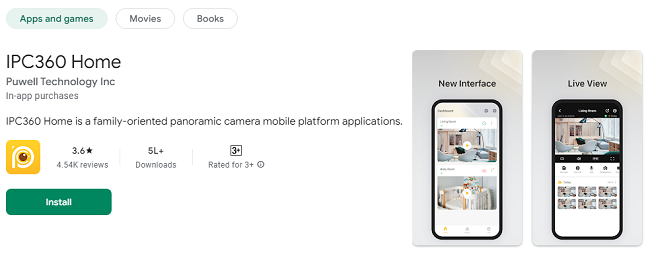
Open the Google Play Store on your device.
Search for "IPC360 Home App."
Click "Install" to download and install the app on your phone or tablet.
For iOS Users:
Open the Apple App Store on your iPhone or iPad.
Search for "IPC360 Home App."
Tap "Get" to download and install the app.
Setting Up the App:
Once installed, open the app and create an account.
Follow the on-screen instructions to connect your IPC360 camera.
Customize settings to suit your preferences and begin monitoring your home.
Enhancing Home Security with IPC360 Home
1. Remote Access Anytime
One of the standout features of IPC360 Home is its ability to provide remote access to your home’s camera feed. Whether you’re at work or on vacation, you can:
Check in on your family.
Monitor your property for any unusual activity.
Stay updated with instant notifications.
2. User-Friendly Interface
The app’s intuitive design ensures that users of all ages can navigate its features effortlessly. From setting up your camera to managing multiple devices, the IPC360 Home App makes home monitoring simple and stress-free.
3. Privacy and Security
Your privacy is paramount. IPC360 Home employs advanced encryption protocols to protect your data, ensuring that your video feed and personal information remain secure. Rest assured that only authorized users can access your camera feed.
4. Multi-Device Support
Monitor multiple cameras from a single account, making it easy to oversee various areas of your home or property. The app supports seamless integration with multiple devices, allowing you to keep everything in one place.
Use Cases for IPC360 Home App
1. Family Monitoring
Stay connected with your loved ones, whether it’s ensuring your kids are safe after school or checking on elderly family members.
2. Pet Care
Keep an eye on your furry friends when you’re not at home. Talk to them using the two-way communication feature or ensure they’re not getting into mischief.
3. Home Security
Protect your home from intrusions or unexpected incidents with real-time alerts and high-quality video footage.
4. Small Business Monitoring
If you’re a small business owner, use IPC360 Home to monitor your store, office, or inventory.
Tips for Optimizing Your IPC360 Home Experience
Position Your Camera Strategically:
Place your IPC360 camera in areas that provide a comprehensive view of your space, such as corners or elevated surfaces.
Ensure Strong Wi-Fi Connectivity:
A stable internet connection ensures smooth video streaming and uninterrupted access to your camera feed.
Utilize Storage Modes Effectively:
Use the trigger mode to save storage space while capturing essential footage, and switch to continuous mode for round-the-clock recording.
Regular App Updates:
Keep the IPC360 Home App updated to access the latest features and security enhancements.
Conclusion
The IPC360 Home App is more than just a home monitoring tool—it’s your gateway to unparalleled security, convenience, and peace of mind. With its user-friendly interface, advanced features, and high-definition video quality, you can confidently keep an eye on what matters most. Download the IPC360 Home App today and take the first step toward a safer, smarter home.
Don’t wait! Visit the Google Play Store or Apple App Store now and experience the future of home monitoring with IPC360 Home.
Updates